
Welcome to Our Blog
Face to Face With the Future
Why facial recognition is becoming a smarter way for employees to log into retail systems
If you run a firearms retail operation, you already know how much happens at the counter in the first few seconds of every interaction. A customer walks in. An employee steps up. A transaction begins. Behind that simple moment is a point of sale system that has to know exactly who is logged in, what permissions they have, what drawer they are using, and what actions they are allowed to take.
For years, that process has relied on one thing: a username and a password.
Passwords have done the job. They still do. But they also come with a long list of friction points that every retailer and every employee has felt. Forgotten logins. Sticky notes on monitors. Shared credentials. Slow handoffs between staff during busy hours. The constant tension between security and convenience.
That is why more retail systems are starting to introduce a different way to identify employees. One that feels more natural and removes a lot of the friction from daily operations.
Facial recognition login.
This is not science fiction and it is not about surveillance. In a retail point of sale environment, facial recognition is simply another way to confirm that the person standing in front of the terminal is the person who is supposed to be using it.
When implemented correctly, it can be one of the most practical quality of life upgrades a retail team ever gets.
Let’s walk through what this kind of system actually does, how it works, and why it is becoming a compelling alternative to typing in passwords all day long.
What facial recognition login really is
In a point of sale environment, facial recognition is used for one purpose and one purpose only: logging employees into the system.
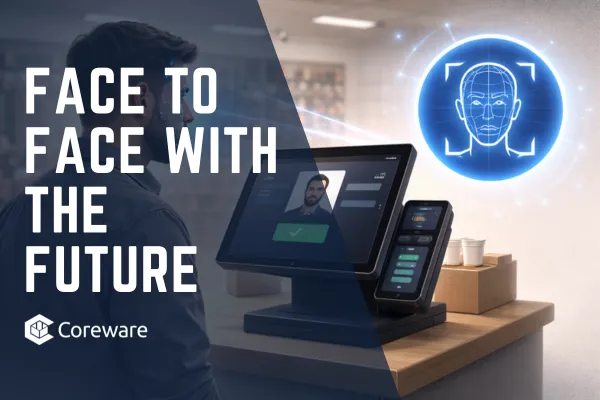
Instead of typing a username and password, the employee looks at the camera attached to the terminal. The system compares what the camera sees to the profile image stored for that employee. If it is a match, the system logs them in.
That is it.
No background scanning. No tracking customers. No recording video. No monitoring behavior. Just a moment of visual confirmation that replaces typing.
In Coreware’s implementation, the requirements are straightforward. The computer must have a camera. The employee must have a profile photo in the system that clearly shows their face. Facial recognition must be enabled in company settings. Once those pieces are in place, the login screen shows a live camera view alongside the traditional username and password fields.
An employee steps up, positions their face in view, clicks log in, and the system verifies their identity.
That is the entire workflow.
From the employee’s perspective, it feels less like a security feature and more like a shortcut.
Why passwords have always been a problem
To understand why this matters, it helps to be honest about how passwords actually get used in real stores.
In theory, every employee has a unique login. In practice, things are rarely that clean. During a rush, someone hops on a register. A coworker stays logged in because logging out and back in takes time. Passwords get shared. Sticky notes appear. People forget which login they were using.
None of this happens because employees are careless. It happens because retail is fast, chaotic, and human.
When a system creates friction, people work around it. That is true in every industry, but it is especially true at the retail counter.
The irony is that passwords are supposed to improve security, but in many real world environments they end up weakening it. When multiple people use the same login, the system loses the ability to track who did what. When passwords are written down, the barrier to misuse drops. When logging in takes too long, people avoid it.
Facial recognition changes that dynamic because it removes the tradeoff between security and speed.
How facial recognition changes the daily flow
Think about the first thing an employee does when they walk up to a terminal.
They log in.
Now imagine that step takes one second instead of ten. No typing. No remembering. No switching accounts. Just a glance.
That difference seems small, but over the course of a day it adds up. More importantly, it changes behavior. When logging in is effortless, people are far more likely to log in correctly.
That means:
Every transaction is tied to the right person
Every drawer is associated with the right employee
Every action in the system has a clear owner
That is not just cleaner data. It is better accountability.
In a firearms retail environment, that matters. You want to know who handled what, who rang up which transaction, and who had access to specific parts of the system. Facial recognition helps enforce that without making employees feel policed.
They are not being watched. They are simply being recognized.
Why employees like it
One of the quiet advantages of biometric login systems is that they reduce cognitive load.
Employees already have a lot to remember. Procedures. Product details. Regulations. Customer needs. Adding another password to that list does not help anyone.
When an employee can walk up to a terminal and log in by simply being present, it feels natural. There is no interruption to their flow. They stay focused on the customer instead of the keyboard.
It also reduces frustration. Nobody enjoys being locked out of a system because they mistyped a password or forgot which one they were supposed to use. Facial recognition eliminates that entire class of problems.
From the employee’s perspective, it feels less like security and more like the system just knows who they are.
Why managers like it
From a management perspective, the value is even clearer.
When every login is tied to a physical person standing in front of the terminal, the data becomes more trustworthy. Reports become more accurate. Audits become easier. Disputes become simpler to resolve.
If there is a question about a transaction, the system shows exactly who was logged in. There is no ambiguity created by shared credentials or forgotten logouts.
It also simplifies onboarding and off-boarding. New employees get their profile photo added and they are ready to go. When someone leaves, disabling their account immediately removes their access. There are no passwords floating around that might still work.
This creates a tighter, cleaner security posture without adding complexity for the team.
How this improves real world operations
Here is where the impact becomes tangible.
Picture a busy afternoon. Two employees are working the counter. One finishes with a customer and steps away. The other steps in. With passwords, there is a pause while one logs out and the other logs in. Sometimes that pause does not happen at all, and the first employee remains logged in.
With facial recognition, the second employee simply steps up, looks at the camera, and logs in. The system switches to their profile instantly.
That means cash drawers, permissions, and tracking all stay correct without anyone having to think about it.
Now multiply that by dozens of shifts, hundreds of logins, and thousands of transactions. The reduction in small errors and small inefficiencies becomes significant.
This helps to tighten up the operational fabric of the store.
What about privacy and control
A common concern with facial recognition is privacy, and it is a valid one. In the context of a retail point of sale, though, the scope is extremely limited.
The system uses a profile photo that the employee already provides. It uses the camera to match the face in front of it to that stored image. It does not scan the employee. It does not record video. It does not identify people walking through the store.
It is simply a login method.
From a compliance standpoint, it is no different than using a fingerprint reader or a badge scanner. It is just another way to confirm identity.
What makes facial recognition appealing is that it does not require employees to carry anything or remember anything. Their face is their key.
Why this fits modern retail
Retail technology has been moving in one direction for years: less friction, more flow.
Contactless payments. Mobile wallets. Tap to pay. Self checkout. All of these are designed to remove steps and reduce friction in moments that matter.
Employee login is one of those moments.
When a system can identify someone instantly and accurately, everything downstream becomes smoother. That means faster service, cleaner records, and fewer mistakes.
Facial recognition does not replace traditional login methods. It simply adds a better one.
Employees who prefer passwords can still use them. Those who want the faster option can use their face. The system becomes more flexible without becoming more complicated.
That is exactly what good technology should do.
Where Coreware fits into this
This is not a theoretical discussion. Coreware’s point of sale system already supports facial recognition login for employees.
It is built directly into the login workflow. It uses the employee profile photo. It works with standard cameras. It can be enabled through company settings.
In other words, it is not a gimmick. It is a real, working feature that retailers can use today.
For firearms retailers who care about speed, accountability, and clean operations, it is one more tool that helps the store run tighter without making the team feel constrained.
And that is what good retail software should always aim for.
If you would like to learn more about facial recognition login and the many other ways Coreware helps retailers operate more efficiently and securely, visit coreware.com.




Have Questions?
Get In Touch For Answers
Copyright 2022 Coreware -- All Rights Reserved